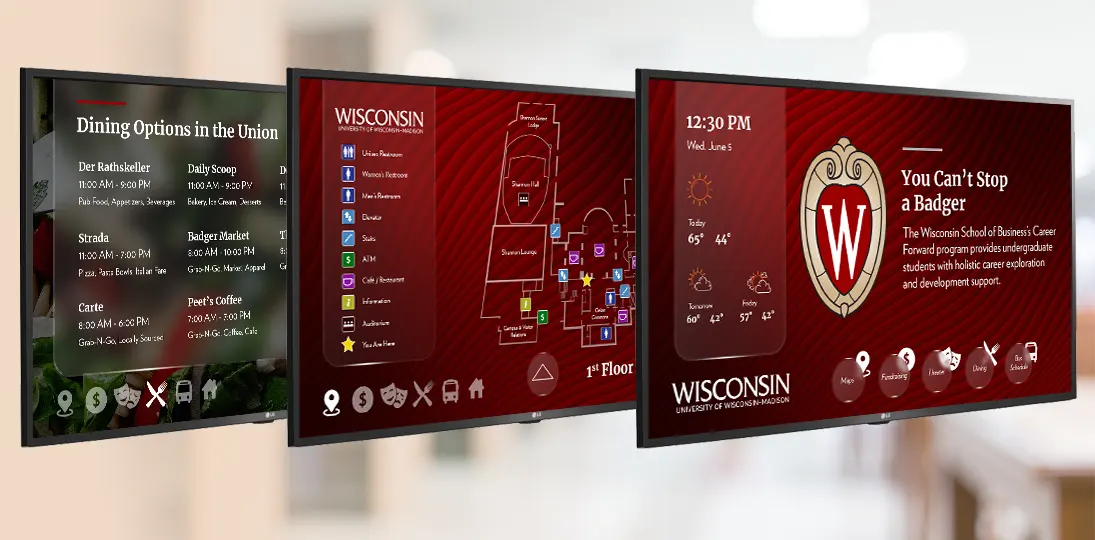
Digital signage for higher education has become one of the most effective ways for colleges and universities to communicate with students, faculty, staff, and visitors. Strategically placed campus digital signs deliver real-time information, promote events and activities, and enhance the overall student experience – all from a single, centrally managed system.
This guide covers everything you need to know about campus digital signage: the key benefits that make it a smart investment for higher education institutions; practical ideas for using it across events, athletics and student recruitment; and best practices for placement, content, and getting the most from your system.
Top Benefits of Digital Signage for Higher Education
What are some of the main benefits of using digital signage in a university or other higher learning environment? Here are the top 15 ways it helps improve the campus experience for everyone:
1. Real-Time Information
Whether it’s campus news, class changes, or cancellations, or even emergency alerts, digital signage can quickly and easily get important information out to the campus community. By integrating digital signage with other campus systems, screens can show timely updates for events, countdowns, menu boards, and more. Everyone on campus can get informed and up to date in real time.
2. Improved Communication
Digital signage makes it easier for everyone on campus to get information without having to check email or read newsletters. It can also help overcome communication barriers by providing information in a visually appealing and easily accessible way. This helps to create a more connected and informed campus community.
3. Increased Engagement
Because good campus digital signage is so visually appealing and can be processed quickly, student and employee engagement is much higher than with other kinds of communications. Incorporating videos, animations, and other interactive elements like QR codes help digital signs capture the attention of the campus community and encourage them to actively engage with your content right then and there.
4. Events Promotion
Digital signs are one of the most effective ways to promote campus events and activities. Universities and college campuses can easily advertise upcoming events, provide event details, and generate excitement among the campus community. This leads to increased attendance at campus events, which helps build a stronger sense of community.
5. Enhanced Wayfinding
Digital signage improves wayfinding on campus by providing clear directions and maps directly tied to directories and event schedules. With touchscreens and kiosks, higher learning institutions can provide interactive wayfinding that allows people to easily navigate the campus. This reduces confusion and frustration among visitors and improves the overall campus experience for everyone.
6. Improved Accessibility
Digital signage also improves accessibility on campus by providing information in a variety of formats, such as text, images, and videos. Content can be designed to meet ADA guidelines using tools like interactive zoom and voice user interfaces. The displays can also be used to show information in multiple languages, making it easier for international students and visitors to navigate the campus. This helps create a more welcoming and inclusive campus environment.
7. Better Safety & Security
Safety and security on campus is improved by providing emergency alerts and safety information pulled from existing CAP (Common Alerting Protocol) applications. Whether automated or manual, universities and colleges can quickly and easily disseminate important safety information to the campus community, instantly overriding screens with alerts and instructions. This helps keep students, faculty, staff, and visitors safe in the event of an emergency.
8. Increased Student Retention
By providing information on campus resources and support services, digital signage can promote tutoring services, counseling services, and other resources that can help students academically succeed. This leads to increased student engagement and ultimately improved student retention rates.
9. Expanded Brand Awareness
Digital signage is a great way to promote and increase brand awareness for universities and colleges. By incorporating the university’s logo, colors, and branding into the messaging, screens reinforce the university’s identity and help create a stronger sense of culture and community. This also helps to attract prospective students and boost enrollment rates.
10. Revenue Opportunities
Universities and colleges can earn income through advertising on their digital signs. Campuses can sell advertising space to local businesses, generating revenue that can be used to offset the cost of the system. Additionally, they can promote campus activities, athletics, and branded merchandise, which helps increase event attendance (meaning ticket sales) and generates additional revenue.
11. Cost Effective
Digital signage is a cost-effective communication tool that can save universities and college campuses money on printing costs. Information is easily updated and changed, eliminating the need for costly reprints, and the manual labor associated with distributing and discarding old communications. Affordable cloud subscription models offer a low monthly price and site licenses are usually available from vendors.
12. Environmentally Friendly
Compared to traditional printed signage, posters, and flyers, digital signage is an environmentally-friendly option. It eliminates the need for paper, ink, and waste, so it’s a more sustainable option for universities and colleges. This helps reinforce the university’s commitment to sustainability and eco-friendliness, which can be appealing to current and prospective students.
13. Easy to Manage
Since many systems offer cloud-based management tools that allow for remote updates and content management, digital signage is easy to administer and maintain. This makes it easier for digital signage managers to update content, and ensures information is accurate and up to date. It also reduces the need for on-site maintenance and can help minimize downtime and disruptions.
14. Customizable & Adaptable
Digital signage can be used for a variety of uses, in a variety of settings. Universities and college campuses can use screens in hallways, classrooms, libraries, and computer labs. Screens can be small or large, interactive or static, mounted on a wall or placed inside a standing kiosk. Digital signs can also be used to display interactive content, such as quizzes and surveys, which can help to increase engagement and provide valuable insights into what engages your audience.
15. Flexible & Scalable
Because digital signage is so flexible and has so many possible configurations, it can be managed by one person or a whole team. User rights and approval processes are completely customizable, and users can be grouped by campus, college, department, or team. Also, a system can start with just one screen and scale up over time as more effective locations are identified and infrastructure is added.
From promoting campus events and improving safety to increasing revenues and cutting waste, digital signage apps can help create a more engaged and informed campus community. With its scalability and versatility, digital signage is an excellent investment for universities and college campuses looking to improve their communication strategies and enhance the overall campus experience for students, faculty, staff, and visitors.
Where to Put Digital Signs on Campus
You only have a few seconds to engage busy students, staff, and visitors, so where you put your campus digital signage displays is as important as what you put on them. Focus on high-traffic areas where messages reach the most people and have the best chance of being seen repeatedly.
Entrances and exits are essential. Capture people’s attention right as they arrive and give them useful information for their commute or upcoming events on the way out. From there, common areas like lobbies, lounges, and student centers are ideal because people linger, giving you time to cycle through more messages or run longer videos. Cafeterias are another high-value location, where menu boards with meal options, daily specials, and nutritional and allergy information make wait times feel shorter while simultaneously delivering content people actually want.
Beyond those anchor locations, computer labs benefit from screens showing station availability and IT policies, and libraries are a natural fit for highlighting resources, check-out policies, and new arrivals — especially when paired with interactive wayfinding. Bookstores can use displays to advertise merchandise, learning resources, and discounts. Other locations worth considering include classrooms, elevator lobbies, and shuttle stops (where real-time transportation information is genuinely useful to students on the move).
Outside meeting rooms and conference areas, digital room signs provide at-a-glance scheduling information that reduces interruptions and helps occupants quickly locate available space. ePaper displays are a particularly practical choice for these installations. Their low-power consumption makes them easy to deploy without running new electrical infrastructure, and their paper-like readability holds up well in bright corridor lighting. The same logic extends to individual desks and collaborative workstations in hot-desking environments, where ePaper signs can reflect real-time availability and reservation details without the bulk or energy costs of traditional screens.
One thing to avoid is choke points – areas where foot traffic naturally narrows. A screen placed there can worsen congestion and quickly become a nuisance rather than an asset. Make sure there is still room for people to pass by if someone stops to look at the sign.
Screen size and placement height both matter more than people expect. A very large display forces viewers to step back to take it all in, so make sure the space can actually accommodate that. In tighter locations, a smaller screen at closer range will serve better. For height, the goal is that as someone approaches the sign and reaches the point where the content becomes readable, they shouldn’t have to crane their neck upward to see it comfortably. For interactive displays specifically, the top of the screen should sit at around six feet from the floor to keep touch interactions natural and accessible. And don’t forget to take ADA requirements into account for at least some of your screens.
Digital Signs and Campus Events
Regardless of the type of organization, the number one thing people use digital signage for is to display information about events. There are a lot of events of all kinds on university and college campuses. These might be school-sponsored or originate with student groups, but everyone wants their happening to be successful. And that means getting people to show up. With a little planning, you can use your digital signage to not only advertise events, but increase participation and improve the entire student experience.
Integrate Calendars
First off, you can tie your digital sign software into whatever calendaring system you already use (Exchange, EMS, Google Calendar, CollegeNet, etc.). So, you update the event info in just one place, and your displays show the changes automatically. This saves a huge amount of time. Plus, once the event is over, it just drops off the playlist.
Democratize the Process
Another way to save time is to open source your events. Let student groups, departments, and colleges create and post their own event notices. You just set up your design specifications and permissions, and then give them access to the system. Provided they follow all the guidelines you have in place, their events get published immediately. If you want more control, you can use approval tools in the software. For design standardization, create a few events templates – people just fill in the blank fields. A good digital signage system that is web-based makes it possible for people to create messages from literally anywhere with an internet connection.
Consider Advertising
You can bring in the community around your campus as well. If there’s a café a lot of students go to, why not open up your campus digital signage to them? They can offer special discounts for students and staff, and also promote on-campus events their clientele (your students and faculty) might find interesting. You can even charge a small fee for this service – most small businesses will immediately see the value in promoting their goods and services to people at your university and will have no problem paying a bit. This way, your digital signage system can pay for itself.
Cross-promotion works well within the university as well. If there’s a big football game happening, maybe the bookstore can sell hats and other gear, or have a special sale on an alumni player’s autobiography; or maybe the student union has episodes of Season 2 of Friday Night Lights on offer. If part of the English Lit reading list this year includes Shakespeare’s Much Ado About Nothing, maybe the theatre club wants to mount a production of it, and the bookstore has copies of his complete works for a discounted price. Or there’s a podcast episode discussing Shakespeare’s relevance today that could also be promoted.
These are all ways to get people informed about and interested in your events, with the advantages spilling over into other departments and colleges. But what about afterwards?
Get Feedback
Use your digital signage to get feedback on your events, so you can tweak future happenings and make them better. Use QR codes or URLs to point people to online surveys with questions like “Was the play ticket price – too high, just fine, too low?” or “How was the podcast’s length/quality?” Or put your survey right there on an interactive digital sign with the survey beside an events playlist – while people take a minute to answer the questions, they are being exposed to more events that are coming up.
Measure ROI
Even during the campaign leading up to the event, there are things you can do to measure ROI. Offer special coupon codes or pass phrases (again using URLs or QR tags) that drive interested people to a unique landing page you’ve created. This lets you immediately track how many people used that code or phrase, and so it gives you an idea of how many people saw your event message on digital signs.
You need to offer something substantive, however, to make it worthwhile for your audience. Offer a discount in price, free spirit gear, or a welcome drink. Make it something tangible that participants can point to and say, “I got this because I used this code”. This encourages others to do the same thing in the future. For a very small outlay, you can have measurable data on how effective your digital signage promotional efforts have been.
Digital Signage and Athletics
Campus sports not only help shape the bodies of students, but their characters as well. The school also benefits, gaining recognition and prestige, and increased revenue flows. You can leverage digital signage for education to extend the reach of your athletics program and maximize its impact for both players and the public.
Digital signage is dynamic, meaning that the content can be changed easily, quickly, and often. As your athletes move closer and closer to that championship, your information also needs to be kept up to date. And changing content is easy, either using in-program design tools, or importing messages from popular programs like PowerPoint. It’s also dynamic because you can add movement, video, and audio – grabbing and keeping people’s attention in a matter of seconds.
And anyone can create and schedule content – the athletics marketing team, the coaching staff, student organizations, bookstores, branded gear vendors, even the food and beverage manager. If your digital signage system is web-based, they can change content from literally anywhere with an internet connection.
Here are some of the most effective ways to use campus digital signage for athletics:
- Use your digital signage to reach out to students. Advertise tryouts and open positions to get everyone who’s interested involved. Add player and staff bios to screens to tout your accomplishments, attracting new recruits and talent to your programs.
- Let people know when an important game is coming up and display the game schedule, so they can lend their support.
- Make it easy to participate by advertising ticket specials, season tickets, spirit events, and specials on team gear. Use a QR code or short URL to drive traffic directly to a dedicated web page, which also makes tracking ROI simple and efficient.
- Keep people in the know by displaying current rankings, records, and stats. You can even use Excel or XML data to update the information on your digital signs using tools your staff is already comfortable with.
- Pair interactive displays with a Hall of Fame board, so people can join in the story of your school’s history and achievements, scrolling through a lot of information at a comfortable pace.
- Improve the audience experience by streaming home and away games to large screens or video walls, or use your digital signage software to send content directly to mobile devices. Archive past games and matches for instant retrieval and viewing.
- Include people by allowing them to use their mobile devices to interact with content like social streams, polls and surveys, and on-the-fly trivia. Even if people can’t be there in person, they can still contribute their voices and support.
- Help people to get to their seats, locate the bathroom facilities and concession stands, and find the shortest route to public transportation or the parking lot using wayfinding. Consider making your maps interactive on touchscreens for a more engaging experience.
- Spread the word about fundraising events in a similar way, and offer sponsors or local businesses the opportunity to advertise on your digital signage to increase revenues.
Digital Signage and Student Recruitment
It’s important for universities and colleges to attract students who will not only thrive in the environment provided, but who will also go on to enhance their school’s reputation. That is why you spend a lot of effort on outreach and marketing. Through a variety of channels, you’ve enticed various prospects to come to the campus and see what it’s like on the ground. Now you can use your school’s digital signage to really show off your facilities and give your institution an edge over the competition.
Today’s undergraduates are the children of millennials – Generation Z, and the oldest Gen Alphas will be going to university by the year 2029. They are extremely tech-savvy, having grown up with the internet, smartphones, social media, and all the elements that make Web 2.0 the Participatory Web (or Social Web). That’s their baseline. They routinely get information of all kinds using digital devices and multitask as a matter of course. They are the most diverse generation ever, with very open and fluid ideas as to what constitutes identity (ethnically, economically, gender, etc.). They are also highly socially responsible and demand the same from the institutions in their lives.
If you want them to choose you, you need to show them that you are in sync with the way they view things and can give them what they want in the way they want it. Get them interested and engaged the very first time they step foot on campus, and there’s a good chance your institution will become theirs. Digital signage is a great modern communications tool to add to your student recruitment strategy to show off what you have to offer.
Who We Are
What is it that makes your school different? Create a narrative through concise, linked digital signage messages that tell the story of what’s on offer. What are your mission and values? Do you have award-winning departments and faculty? Are there online learning, MOOCs, or blended learning programs? Do you have study abroad programs? Show these off on screens.
And don’t be afraid to be yourself – bland corporatized language will not appeal to this age group. Try some personality and humor, while also conveying useful information and exciting opportunities. You want prospects to see your messages and think there are unlimited possibilities available to them. Get across an impression of what it might be like to study at this campus on a day-to-day basis. And be sure to highlight daily communications on the screens, so they see that they’ll have access to information on a regular basis.
When it comes to imagery, try to use pictures of actual students at your facility. Generation Z doesn’t respond well to stale clichés and stock imagery (which they will probably recognize from websites and advertising). But make sure your images are high quality – low-res or pixelated pictures will give the impression that you are either inept when it comes to tech, or so out of touch with the modern world that you don’t see a problem.
Data visualizations and graphs can be a great way to get across information in a way that’s fast to process and visually appealing. If your school outperforms competitors or ranks higher than the national average in certain categories (graduate employment, international student mix, etc.), show that using comparative stats in dynamic visuals.
Highlight noteworthy faculty, both past and present – but especially present. These are people the students will actually get to talk with and learn from. Tout their awards and achievements to excite prospective students and their parents.
We Want You
In the lobby, start with welcome messages to specific prospects or groups when they visit your facility, and make sure to tailor it to each visitor. They’ll appreciate that someone took the time to learn who they are.
Let them know that you know who they are and what’s important to them. Their priorities are also your priorities. Show your recycling initiatives, opportunities for volunteerism and charity work, donations the school makes to the community and worthy causes. You can also display energy dashboards on digital signs to show your conservation efforts in real time.
Show them potential futures. Spotlight successful alumni and students currently enrolled who have achieved recognition in their fields. This can be very inspiring to prospects, as they see what people have done there and they think “I can do that.” Show off internships, career services, research and leadership opportunities to communicate not just what’s happening now, but a vision of the future that they can aspire to.
Dialogue is very important to these generations. They don’t appreciate top-down communications and expect to have a say in things. Having a consistent feedback system in place is sure to impress. Showing messages with a friendly URL or QR code to submit suggestions regularly in your digital signage playlist helps create a culture of two-way communication and gets across that your institution cares about what students have to say.
The vast majority of college students say it’s important to them that the institutions they apply for are technologically savvy. Advertise your school app, social networks, and collaboration platforms. Highlight hardware and software available to them on site, BYOD policies, digital literacy, digital equity, and other tech topics, so they know your campus is constantly evolving to meet trends and expectations.
When prospective students come to visit, consider using your digital signs to orient potential newcomers to the campus, as well as meet current and prospective students. You can even use your digital signs to run a campus scavenger hunt during orientation – a creative way to familiarize new students with both the campus and your wayfinding system. You can also highlight support organizations, housing options, meal plans, scholarships, financial aid, and other topics likely to be on the minds of new students and parents.
Life Here with Us
Your digital signage system not only shows off the advantages of your school; it’s an advantage in itself. It shows prospective students that you have a modern, dynamic communications strategy in place. Be sure to point out how you’re using your screens to enhance campus life and the student experience.
Touchscreens with interactive wayfinding maps and directories make getting around campus easy and efficient. You can include a QR code on screens, so students can download the map to their phones, taking it with them for turn-by-turn directions to wherever they need to go.
Near cafés, food trucks, and other dining services areas, menu boards can display current specials and menus, nutritional and allergy information, and even integrate with a web-based ordering system, so people can choose what they want at the screen and then go pick it up when their order is ready, reducing queuing times and congestion.
Libraries can have digital signs that display policies and procedures, new titles, and available workstations. Combining with various systems can also allow interactive screens to reserve computers and even check out books right at the sign itself.
Your bookstore can advertise books, branded gear, and supplies. You can even include a special coupon code on screens or ask students to snap a photo of an item on screen to claim a discount – adding a little gamification to your promotions.
Highlight your campus athletics with team and player bios, game schedules, current standings, past achievements, recruitment incentives, gear, and more promoted on digital signs. Add wayfinding to make navigating the stadium easy and even stream away games on your screens.
If your campus has shuttles or students use local public transportation to get around, placing digital signs in lobbies near exits showing current schedules and real-time route info allows them to wait safely inside out of the weather. You can also show local traffic routes and congestion updates for commuters.
Be sure to brief prospective students and their parents on all the ways you work to keep students healthy and safe. Show health and wellness tips and highlight your campus wellness facilities. As part of your campus safety plan, your digital signage system’s alert mode lets you override scheduled messages on the entire system or on specific screens in the event of an emergency. You can also use your screens to promote safety by showing policies and tips and providing emergency contact info.
Any way you can integrate your digital signage offering with students’ smartphones will be very much appreciated. This can be as simple as always having QR codes as your call to action, but can extend even more, allowing people to take wayfinding routes, transportation, event schedules, and more with them as they move around the campus.
By using your digital signage for student recruitment in a truly integrated way, touching on all aspects of campus life, you’ll show prospective students that yours is a forward-thinking institution that values the benefits of technology and understands the times we live in.
For a young person about to embark on one of the greatest adventures of their life, you can get them excited to begin. Use your screens to engage them with a vision of their future, and all of the ways you can help them get there.
The Future of Campus Communications
Digital signage for higher education is one of the most versatile communications investments a campus can make to engage the wide variety of audiences that go to those locations. Timely information is shared instantly to exactly the people who need to see it.
Strategically placed digital signs can also improve campus life, with interactive wayfinding, emergency alerts, and promotion of events. Athletics is also a perfect fit for these sorts of communications, and can even get a boost in attendance and revenues with the skillful use of messaging.
In fact, the entire system can be used to generate revenues, offsetting initial and ongoing costs. Because it’s so flexible and scalable, any number of people can run the system with ease. Measurable ROI is fairly easy to get, so the system can always be improving to better and better meet the needs of whichever audience is being targeted.
With today’s students being so tech savvy, a good digital signage deployment can attract the best and brightest, and using the medium in creative ways shows them that you are fully committed to technological progress, that you speak their language.
Universities have been using digital signage for years, and the future just keeps looking better and brighter as new technologies emerge and get integrated. In fact, some of those students on campus right now will likely be among those driving the future, developing new systems and techniques as the information age continues to unfold in the 21st century.
Frequently Asked Questions About Digital Signage for Higher Ed
What is digital signage used for in higher education?
Campus digital signage is used to communicate with students, faculty, staff, and visitors across a wide range of needs – from real-time announcements and emergency alerts to event promotion, wayfinding, menu boards, athletics updates, and student recruitment. Because content can be updated instantly and managed centrally, it’s one of the most efficient and flexible communications tools available to colleges and universities.
How does digital signage improve student engagement on campus?
Digital signage captures attention more effectively than email, printed flyers, or static posters because it uses motion, visuals, and timely content that’s relevant to where students are right now. Interactive elements like QR codes, polls, and touchscreen directories give students a reason to stop and engage rather than walk past. When content is well-targeted and frequently updated, students learn to look to screens as a reliable source of campus information.
Can digital signage help with campus safety and emergency alerts?
Yes. This is one of the most important capabilities of a campus digital signage system. Screens can be integrated with CAP (Common Alerting Protocol) applications so that emergency alerts automatically override scheduled content across the entire campus or on specific screens. Whether triggered automatically or manually, safety information reaches everyone in the building immediately, without relying on students to check their phones or email.
Is digital signage cost-effective for colleges and universities?
Over time, yes. The upfront investment is offset by eliminating recurring printing, distribution, and disposal costs for posters and flyers. Cloud-based subscription models keep ongoing costs predictable, and site licenses offer significant savings for larger deployments. Campuses can also generate revenue by selling advertising space on screens to local businesses, which can further offset system costs.
How difficult is it to manage a campus digital signage system?
Modern digital signage platforms are designed to be managed by communications staff, not IT specialists. Cloud-based tools allow content to be updated from anywhere with an internet connection, and user permissions can be set so that individual departments, student groups, or colleges manage their own content within guidelines set by a central administrator. A well-configured system can be run effectively by a single person or distributed across a large team.
What should I look for in a digital signage system for my campus?
Look for a platform that offers enterprise-grade scalability, calendar integrations with systems you already use (such as Exchange, Google Calendar, or EMS), CAP-compliant emergency alert capability, content approval workflows, and support for interactive wayfinding. Cloud hosting and site licensing are worth prioritizing for larger campuses, and a vendor with a proven track record in higher education will understand the specific communication challenges your institution faces.