Keep your Visix applications updated for new features and better system performance.
Running the most current version of our software ensures you get the most from your digital signage system. Each release improves system performance and gives you new tools and features that help you create, manage and deliver your visual communications faster and easier.
Every client can purchase the updates, and our support subscription clients receive them for free. Need some advice? We’re happy to help you pick the best options for both software and hardware upgrades.
AxisTV Signage Suite v.1.112
AxisTV Signage Suite v.1.112 delivers improvements for content creation and scheduling, notifications and alarms, and technical updates. This release introduces an AI message creator, expanded template options, better playlist name visibility, and third-party updates to display PowerPoint and webpages – all designed to help you get the right content on screens with greater speed and ease.
Design Messages with AI
Creating great-looking content just got a lot easier. The new AI Message in AxisTV Manage can turn a simple description into up to three polished, ready-to-use designs – powered by Google Gemini.
Describe what you want, choose your favorite design, and add it to your screen. No external apps, no design experience required. It’s a faster path from idea to screen, especially for teams that don’t have dedicated creative support.
Quick-Start Templates in Portrait Format
Quick-Start stock message templates – ready-made designs available from the Visix Store – previously offered only in wide (16:9) format are now offered in portrait (9:16) format. Whether your screens are horizontal or vertical, you’ll have polished starting points for both. Both formats are available directly from the Overview page in AxisTV Manage.
Full Playlist Names Displayed
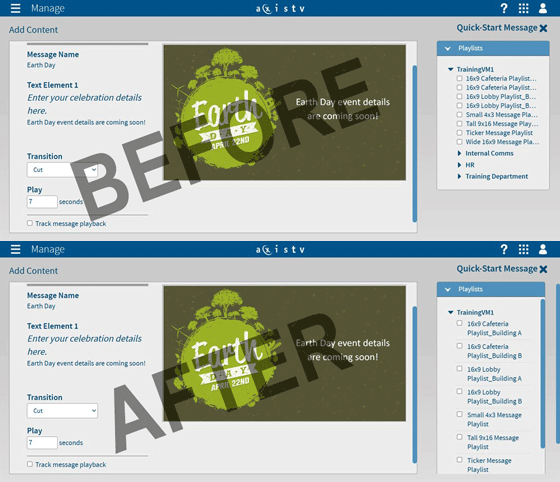
In the Add Content workflow, long playlist names used to get cut off – making it tricky to confirm you were selecting the right one. Playlist names now wrap automatically so the complete name is always visible. Small fix, real difference.
Smarter Notification Delivery
Notification emails will now only go to active users. Previously, disabled accounts continued to receive these emails – notice of offline players, content pending approval, and the like. Going forward, those emails will only reach the people who can act on them.
PowerPoint Upload Fix
An update to the Aspose library (now version 26.4) resolves an issue where modern .pptx files couldn’t be uploaded directly and had to be saved down to the older .ppt format first. If your team was working around this, you no longer need to.
Microsoft Edge Update
The Web Browser widget has been updated to the latest version of Microsoft Edge WebView2, based on Chromium 149. Clients using the widget in layouts or scheduling web pages URLs as messages will benefit from this improvement.
Other Enhancements:
- Other usability enhancements and bug fixes
Connect v.3.21
The latest version of our Connect Room Manager is now available with these updates:
- Google Calendar integration now supports both Service Accounts and User Accounts
- Upgraded Apache Tomcat to version 9.0.93
- Other usability enhancements and bug fixes
AxisTV v.9.9.3
- Bug fix allows messages to be scheduled in 2021 and future years
- Exchange widgets now support Office 365 Modern Authentication, based on OAuth 2.0
- Customers will need to reconfigure Exchange widgets after moving to OAuth
- Support for Flash player removed from all apps
- Adobe ended support for Flash in December 2020; Microsoft has removed Flash from several OS versions as a result
- Flash-based date, time and weather modules, and any other Flash content, will stop playing in AxisTV
- Other usability enhancements and bug fixes
Consider switching to our AxisTV Signage Suite platform. If you don’t have a support subscription, we’ll work with you to put together the best package for your timeline and budget. To make things really easy, you can run AxisTV 9 and AxisTV Signage Suite concurrently while we’re making the switch to ensure no interruption in service.