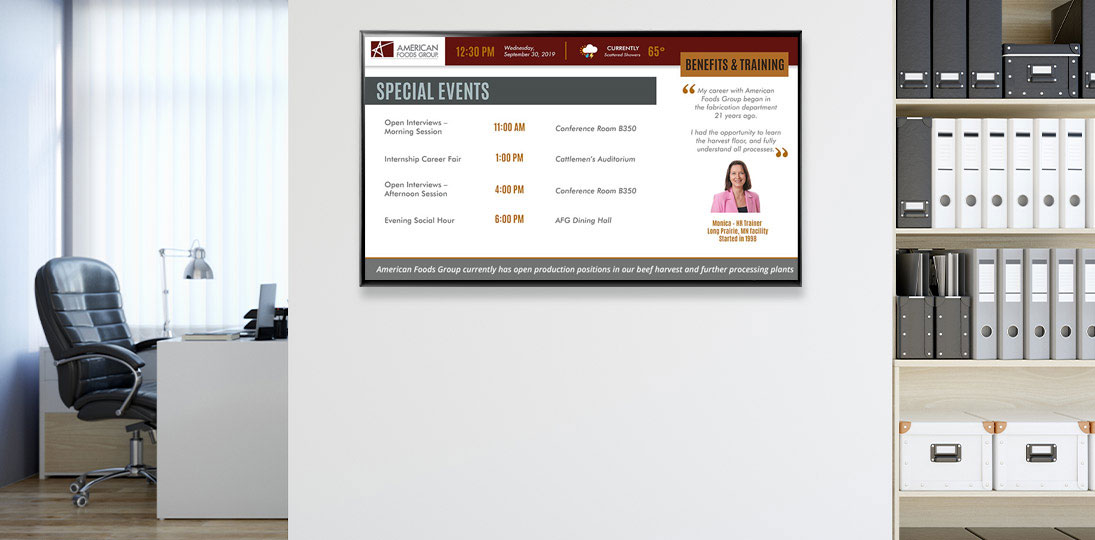
In the modern communication landscape, digital signage has evolved from a “nice-to-have” luxury into a mission-critical business tool. Whether you are managing a corporate campus, a higher education facility, or a retail environment, your screens are the heartbeat of your organizational communications and culture.
However, many organizations fall into the trap of “set it and forget it.” Installing the hardware is just the beginning. To truly see a return on investment and maintain audience engagement, you must navigate the complexities of content strategy, technical maintenance, and user psychology.
This guide draws on real-world experience to give you a practical roadmap for digital signage excellence – from the first day of installation to long-term system optimization.
Part 1: Starting Strong: The First 90 Days
The “honeymoon phase” of a new digital signage system is the best time to establish habits that ensure long-term success. If you’ve just finished your installation, the real work is only beginning.
Establishing Your Digital Signage “Success Squad”
One of the most common reasons digital signage fails is the lack of ownership. To prevent your screens from becoming expensive wall art, you need a dedicated team:
- The Content Leader: Someone responsible for the “voice” of the signage. They ensure the messaging is on-brand and timely.
- The Technical Lead: The go-to person for hardware issues, software updates, and network connectivity.
- Departmental Contributors: Don’t let content become a bottleneck. Empower different departments (HR, Marketing, Sales) to contribute to their specific zones.
Defining Your Objectives and Metrics
You cannot measure success if you haven’t defined it. Are you trying to reduce perceived wait times? Boost employee morale? Increase cafeteria sales? Define two or three specific goals first, then build your measurement approach around them.
- System Analytics: Track how many times a message plays, which screens need more content, who the power users are, and who needs more training.
- Quantitative Metrics: Use QR codes or short URLs to track how many people are taking action from a screen.
- Qualitative Metrics: Conduct anonymous surveys to ask employees if they feel more informed since the installation.
Creating a Content Calendar
Stale content is the silent killer of digital signage. Before you go live, have at least two weeks of content scheduled. Map out recurring themes: “Metric Mondays,” “Wellness Wednesdays,” or “Employee Spotlights.”
Part 2: 11 Common Digital Signage Mistakes (and How to Fix Them)
Understanding how to fail is often more instructive than knowing how to succeed. Many organizations repeat the same mistakes over time, leading to “screen fatigue” where the audience subconsciously ignores the displays.
1. Treating Digital Signage Like Print
A digital sign is not a poster. If you take a PDF flyer and stretch it across a 16:9 screen, it will look unprofessional and be impossible to read. Digital signage requires motion, hierarchy, and high contrast.
2. The “Wall of Text” Syndrome
Your audience is usually on the move. They have roughly 7 to 10 seconds to absorb your message. If your slide has more than 30 words, they won’t read it. Use the “3×5 rule”: Three lines of text with five words each, or five lines of text with three words each.
3. Ignoring the Viewers’ Line of Sight
Placement is everything. A common mistake is mounting screens too high (the “airport lounge” effect) or in areas where people are rushing and can’t stop to look. Aim for eye level in “dwell time” zones, like waiting areas, break rooms, and lobbies.
4. Technical Neglect and Broken Feeds
Nothing looks worse than a “Windows Update” screen or a “No Signal” icon. Regular maintenance is required to ensure the software is running and the data feeds (like weather or news) are still active.
5. Lacking a Clear Call to Action
Every message should answer the question: “What do I do next?” Use phrases like “Scan here to register,” “Visit the website for details,” or “Join us at 2:00 PM.” Without a call to action, you’re providing information, but not communication.
6. Poor Design Fundamentals
Avoid clashing colors, small fonts, and low-quality images. Use sans-serif fonts for better readability from a distance, and make sure there is a stark contrast between the text and the background.
7. Sound Without Strategy
Blasting audio in a quiet office environment will make people hate your signage. Conversely, having no audio on a video wall in a loud student union makes the content feel disconnected. Use audio sparingly and only when it adds value to the environment.
8. The “Zombie” Playlist
If an employee sees the same birthday message from three weeks ago, they will stop looking at the screen entirely. Content must be fresh and updated frequently.
9. Forgetting Local Relevance
A global corporate message is fine, but people care about what’s happening in their building or area. Include local weather, office-specific announcements, and local team wins.
10. Ignoring Feedback
If your audience finds the screens distracting or useless, you need to know. Create a feedback loop to adjust your strategy based on audience comments.
11. No Crisis Plan
In an emergency, your digital signage should be your most powerful tool. Failing to integrate your screens with an emergency alert system (CAP) is a major oversight.
Part 3: Mastering CMS Maintenance and System Health
Your Content Management System (CMS) is the engine of your deployment. Like any engine, it requires regular “oil changes” to prevent a breakdown.
Routine Technical Maintenance
- Software Updates: Ensure your media players and CMS software are running the latest versions. These updates often include critical security patches and new features that improve performance.
- Hardware Reboots: Schedule automated reboots for your media players during off-hours (e.g., 2:00 AM) to clear out cache and prevent memory leaks.
- Data Backups: Keep your content library and system configurations backed up. If a server fails, you don’t want to lose years of creative work.
Naming Conventions: The Secret to Sanity
As your system grows, you will have hundreds of files. Without a naming convention, finding an old asset is impossible. Use a standard format like: [Date]-[Department]-[Location]-[Subject].
Example: 022426-HR-Atlanta-BenefitsEnrollment.jpg
Optimizing Your Network
Digital signage can be bandwidth-heavy, especially with 4K video. Work with IT to ensure your screens are on a VLAN (Virtual Local Area Network) to protect security and ensure consistent playback without lagging.
Part 4: Reinvigorating Stale Signage
If your signage is already live but feels stagnant, use these three strategies to breathe new life into it.
1. Focus on the Audience
Shift your perspective from what you want to say to what they want to hear. Remember that digital signage is about people communicating with people.
- Personalize: Use data-driven content to show real-time stats that matter to your viewers.
- Gamify: Run contests where the leaderboard is displayed on the screens.
- Humanize: Show photos of the people behind the work.
2. Leverage Automated Content
Manual updates are the biggest hurdle to fresh content. Use RSS feeds, social media integrations, and integrated data feeds with systems you already have to keep screens moving without manual intervention.
- Automated Calendars: Sync your Outlook or Google Calendar, so event listings update themselves.
- News and Stock Updates: Keep a ticker at the bottom for real-time updates.
- Subscription Feeds: Show wellness, safety, traffic, and other feeds to ease the burden on your designers.
3. Embrace White Space and Minimalist Design
Complexity is the enemy of clarity. If your screen is cluttered with five different zones, the eye doesn’t know where to land. Try a one-zone day where a single, powerful image and three words occupy the entire screen. Simplicity will grab more attention than a cluttered dashboard.
Part 5: The ROI of Engagement – Why It Matters
Investing time in digital signage isn’t just about aesthetics; it has a direct impact on the bottom line. Statistics show that:
- Visual aids make presentations 43% more persuasive.
- Digital signage can increase brand awareness by nearly 48%.
- In the workplace, high engagement leads to a 37% reduction in absenteeism and a 21% increase in productivity.
When you avoid the common mistakes of stale messaging and technical neglect, you create a communication loop that fosters trust. People subconsciously perceive organizations with polished digital signage as more modern, transparent, and trustworthy.
Part 6: Checklist for Long-Term Success
To ensure your digital signage remains a success for years to come, follow this recurring checklist:
Weekly
- Review the playlist for expired content.
- Check that all screens are physically powered on and showing the correct content.
- Review upcoming events and ensure they are scheduled.
Monthly
- Analyze your metrics (QR code scans, link clicks).
- Meet with the “Success Squad” to brainstorm new content themes.
- Check for software/firmware updates.
Quarterly
- Conduct a walk-through from the perspective of a visitor. Is the text legible? Is the audio level appropriate?
- Refresh the look and feel of your templates to prevent visual boredom.
- Audit user permissions—remove people who have left the company or changed roles.
Conclusion: Digital Signage is a Living Ecosystem
Digital signage is not a static installation; it is a living, breathing ecosystem of technology and creativity. By avoiding the common pitfalls of poor design and technical neglect, and by focusing on a customer-centric content strategy, you can turn your screens into your organization’s most valuable asset.
The difference between a failing system and a thriving one is intentionality. Every content decision and every maintenance task should serve a purpose: to connect, to inform, and to inspire.
Frequently Asked Questions About Maintaining Digital Signage
How often should I update my digital signage content to keep it effective?
You should aim to refresh your primary messages at least once a week, while utilizing automated feeds (like news, weather, and social media) to provide real-time updates every hour. This prevents “screen blindness,” where viewers begin to ignore displays because the content never changes.
What is the ideal “dwell time” for a single digital signage message?
The industry standard is between 7 and 10 seconds per slide, depending on the complexity of the message. If your audience is in a high-traffic hallway, consider shortening to 5 seconds; if they’re in a waiting area or breakroom, you can extend it slightly.
Can digital signage be used for emergency messaging and safety alerts?
Yes, most professional systems can integrate with Common Alerting Protocol (CAP) or mass notification software to instantly override all content with emergency instructions. This turns your screens into a life-safety tool that provides visual directions during drills or actual crises.
How can I measure the ROI of my digital signage investment?
Track engagement by using screen-specific QR codes, unique short URLs, or “mention this screen” promo codes to see how many viewers take action. You can also measure success through internal surveys to gauge improvements in employee engagement or brand recall.
What is the most common technical mistake in digital signage maintenance?
The most frequent mistake is neglecting software updates, which can lead to screens showing error messages or outdated system pop-ups. Scheduling automated reboots and regular firmware checks ensures your hardware remains secure and performs reliably.