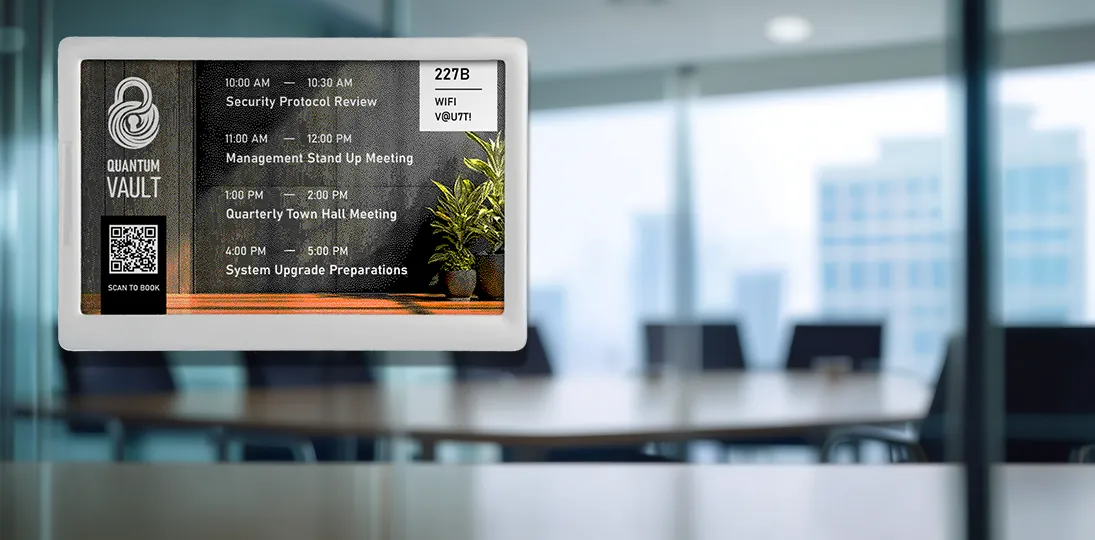
In the modern workplace, the way we manage physical spaces has become as critical as how we manage digital workflows. As organizations transition toward more flexible, activity-based environments, the traditional methods of booking meeting rooms – sticky notes, printed paper schedules, or just wandering hallways in search of a free space – are no longer sufficient. Enter the era of professional digital room signs.
Digital room signs are more than just small screens outside a door; they’re the front-facing interface of an intelligent space management strategy. From interactive touchscreens to eco-friendly ePaper (electronic paper) displays, these digital signs transform how employees interact with their surroundings, reduce administrative friction, and provide facility managers with data needed to optimize costs.
In this comprehensive guide, we’ll explore why professional digital signage is superior to consumer tablets, how to implement the “3 Ms” of space management, and the specific ways digital room signs improve business operations across the board.
Tablets vs. Professional Room Signs: Why Consumer Grade Falls Short
When organizations first decide to digitize their meeting room schedules, the temptation to use consumer tablets like iPads or Android devices is strong. They are familiar, relatively inexpensive upfront, and ubiquitous. However, using a consumer-grade tablet for commercial space management tasks often turns out to be a false bargain – one that leads to higher costs and more headaches down the road.
Hardware Built for the Task
Professional digital room signs are engineered for 24/7 operation. Consumer tablets are designed for intermittent handheld use. In a commercial setting, tablets often face “battery bloat” from being constantly plugged in, or they require frequent manual recharging. In contrast, professional models are designed with Power over Ethernet (PoE) or long-life batteries specifically suited for constant uptime.
Furthermore, viewing angles matter. Tablets are designed to be viewed head-on by a single user. Professional room signs feature high-contrast, low-glare screens with wide viewing angles, ensuring that an employee walking down a long corridor can see at a glance whether a room is occupied or not without having to stand directly in front of the screen.
Software and Security
Tablets are essentially scaled-up smartphones. Without heavy (and often expensive) mobile device management (MDM) software, they remain open to security risks. Any passerby can use an unsecured tablet to browse the web or check social media.
Professional digital signage software, however, is locked down by design. It allows for administrative PIN protection and centralized management. When you use professional digital signs, you aren’t just buying a screen; you’re buying a secure endpoint that integrates seamlessly with enterprise-level scheduling applications like Microsoft Exchange, Google Calendar, EMS, and CollegeNET.
Support and Longevity
Most consumer tablet warranties are voided the moment they’re installed in a commercial environment. If a tablet fails after six months of use, the manufacturer is under no obligation to replace it. Professional digital room signs come with commercial warranties and dedicated support teams who understand the unique needs of a digital signage deployment.
The 3 Ms of Efficient Space Management: Measure, Monitor, and Manipulate
To get the most out of your facility, you need to treat your physical space as a measurable asset. Digital room signs play a pivotal role in what we call the “3 Ms” of space management.
1. Measure: Understanding Actual Usage
You cannot manage what you do not measure. Many organizations find that their rooms are “booked” on the calendar but sit empty in reality, a phenomenon known as “ghost meetings.”
By using interactive digital signs, you can require users to check in to their meeting on the screen. If no one checks in within ten minutes, the digital signage software can automatically release the room back into the pool of available spaces. This provides a clear data trail of which rooms are being used, which are being ignored, and which departments are the biggest culprits of “ghost” bookings.
2. Monitor: Real-Time Visibility
Monitoring is about the here and now. Digital room signs provide instant visual cues to anyone in the office. Most professional signs include availability lights that are green when rooms are vacant and red when occupied. This immediate visibility reduces “room poaching,” where a group ducks into an empty-looking room only to be kicked out five minutes later when the rightful occupants arrive.
Many digital signs also allow employees to monitor the status of resources within the room, such as projectors or whiteboards, directly from the interface.
3. Manipulate: Optimizing for the Future
Once you’ve measured and monitored your space, you can manipulate your environment to increase efficiency. If data shows that 80% of your meetings involve three people or fewer, but they are consistently booking your 12-person boardroom, you might decide to subdivide that boardroom into three smaller “huddle spaces” or find smaller, alternative places for them to use.
This data-driven approach allows you to lower overhead costs (like electricity and climate control for underused rooms) while simultaneously increasing employee satisfaction by providing the types of spaces they actually need.
Interactive Room Management: Beyond Static Schedules
Modern digital room signs do more than just show a name and a time. They are interactive hubs that empower employees to manage their own workday.
Walk-up Reservations
One of the greatest benefits of interactive room signs is the ability to book a room right at the door. If a spontaneous brainstorming session breaks out in the hallway, team members don’t need to return to their desks to check a calendar. They can simply find a “green” room, tap the screen, and reserve it for 30 minutes on the spot. Because the sign is integrated with the central scheduling app, this reservation is instantly updated across the entire company network.
Resource Reporting
What happens when a conferencing camera fails or projector bulb blows? Usually, the problem goes unreported until the next meeting starts, causing a delay. With interactive digital signs, users can touch an icon on the screen to report a broken resource. An automated email is sent to the office manager or IT department, and the room sign can even display a warning to future users that certain tech is currently unavailable.
Wayfinding and “Nearby Room” Suggestions
If the room you wanted is booked, a smart digital sign shouldn’t just say “No.” Interactive signs can be programmed to show a map of the floor or a list of nearby rooms that are currently vacant. This keeps the workflow moving and prevents the frustration of wandering the office in search of a place to sit.
Extending Your Digital Signage Deployment
A common mistake is treating room signs as a separate silo from the rest of your digital signage network. In reality, room signs should be seen as high-value real estate for your internal communications.
Unified Messaging
Professional digital room signs are digital signs in their own right. When a room isn’t hosting a meeting, you can run content playlists alongside schedules, either fullscreen or just in a small corner of the display. This ensures that employees who spend much of their day in meeting areas will still see corporate announcements, employee recognition, or upcoming event reminders.
Emergency Alerts
Safety is a primary concern for any facility manager. By integrating your room signs into your central digital signage system, you can ensure that emergency alerts (such as weather warnings or fire drills) override room schedules instantly. This provides a critical layer of safety in areas where people might otherwise be “tucked away” in soundproof rooms.
Branding and Personalization
Digital signs allow for a level of professional polish that paper cannot match. You can display your branding and logo, or better yet, welcome a visiting client by displaying their logo on the sign outside the room where they’ll be spending the day. This small touch of personalization can have a massive impact on the visitor experience.
Sustainable Solutions: The Rise of ePaper Room Signs
For organizations focused on sustainability and LEED certification, traditional powered screens might not always be the best fit for every location. This is where ePaper room signs come in.
The Benefits of ePaper Technology
ePaper signs work similarly to an e-reader: they only consume power when the image on the screen changes. This means they can run for years on a single set of batteries, making them the ultimate green digital signage solution. The total cost of ownership is also much less than LCD signs.
- Zero Cabling: Because they’re battery-powered and updated via RF or Wi-Fi, you don’t need to pull Ethernet or power cables through walls. This makes them perfect for glass-walled offices or historic buildings where drilling is prohibited.
- Office Hoteling: ePaper signs are lightweight and easy to move. They’re ideal for hot-desking or office hoteling, where they can serve as digital nameplates that update whenever a different employee reserves a desk for the day.
- Reduced Waste: By replacing paper schedules with ePaper signs, a large organization can save thousands of dollars a year in paper and toner costs, not to mention the labor hours spent manually changing those signs.
Improving Business Operations: Four Key Impacts
When you consolidate the benefits of digital room signs, four distinct business improvements emerge:
1. Increased Productivity
By eliminating the search for rooms, you give time back to your employees. When meetings start on time because the room was easily located and the resources were confirmed as functional, the cumulative impact on productivity is staggering.
2. Enhanced Employee Experience
Frustration with “stolen” rooms or broken equipment is a major contributor to workplace dissatisfaction. Providing clear, interactive, and reliable tools for space management shows employees that their time is valued and their environment is managed with their needs in mind.
3. Professionalism and Reputation
First impressions matter. A hallway lined with sleek, glowing digital signs looks significantly more professional than one cluttered with taped-up paper schedules or boring plaques with no current information about what’s happening in that room. For clients, investors, and potential hires, this tech-forward approach signals that the organization is organized, modern, and efficient.
4. Lowered Overhead
Data-driven space management allows you to “right-size” your real estate. If you can prove through digital signage analytics that you are only using 60% of your office footprint, you can make informed decisions about downsizing or subletting, potentially saving significantly on rent and operating costs.
Implementation Tips for a Successful Rollout
If you are ready to add conference room signs to your digital signage deployment, keep these best practices in mind:
- Start with the End User: Ask your employees what their biggest pain points are. Do they need more huddle spaces? Is it hard to find a temporary office? Use these insights to choose between simple ePaper signs and high-functionality touchscreens.
- Ensure Calendar Integration: Your digital signage software must talk to your calendar system. If they aren’t synced, you’ll end up with double-booking disasters that will cause people to lose faith in the system.
- Think About Mounting: Consider the surfaces. Will you be mounting on glass, drywall, or brick? Many professional room signs offer specialized mounting kits for glass that hide the cables for a clean, floating look.
- Content Matters: Don’t just show a list of names – show start and end times. Keep the text large and legible, and don’t overcrowd the screen. Visually highlight what’s happening in the space right now. Use icons for resources.
- Pilot the Program: Start with one floor or one department. Gather feedback, adjust the settings and policies (like the “auto-release” timer for ghost meetings), and then roll out to the rest of the facility.
The Future of the Intelligent Workplace
Digital room signs are no longer a “nice-to-have” luxury; they are a fundamental requirement for the modern, efficient office. By moving away from consumer tablets and embracing professional digital signage solutions, organizations can gain unprecedented insight into how their space is used, reduce waste, and create a more harmonious environment for their most valuable asset: their people.
Whether you choose the interactivity of PoE touchscreens or the sustainable simplicity of ePaper signs, the goal remains the same: to create a space that works as hard as the people inside it. By following the “3 Ms” and integrating your room signs into a broader digital signage strategy, you ensure that your facility is not just a place where work happens – it’s a tool that makes work better.
Frequently Asked Questions About Professional Room Signs
Can digital room signs sync with my existing office calendar?
Yes. Professional digital signage software integrates directly with popular platforms like Microsoft 365, Google Calendar, and EMS to reflect real-time availability.
What is the difference between ePaper room signs and touchscreen room signs?
ePaper room signs are battery-powered and wireless, making them ideal for glass walls, historic buildings, or hoteling environments where cabling is difficult – and they can display QR codes for quick space booking. Touchscreen room signs run on PoE and offer full interactivity: on-screen booking, meeting check-in, resource reporting, emergency alerts, and more. Choose ePaper for simplicity and flexible installation; choose touchscreens when you need an enterprise-grade, fully interactive room management hub at every door.
Do I need to run wires to every single door?
Not necessarily. While PoE (Power over Ethernet) is standard for interactive screens, ePaper room signs are battery-powered and wireless, making them perfect for glass walls or retrofits.
How do room signs prevent “room poaching”?
Bright LED availability lights provide instant visual cues from down the hall, while on-screen schedules clearly show who has reserved the space, when, and for how long.
Can I use these signs for things other than meeting schedules?
Absolutely. When not in use for a meeting, digital signs can display company news, emergency alerts, or even custom branding to welcome specific visitors.
Are professional room signs more expensive than consumer tablets?
While the initial cost may be higher, professional signs save money over time by offering commercial-grade longevity, lower maintenance needs, and built-in security that tablets lack.