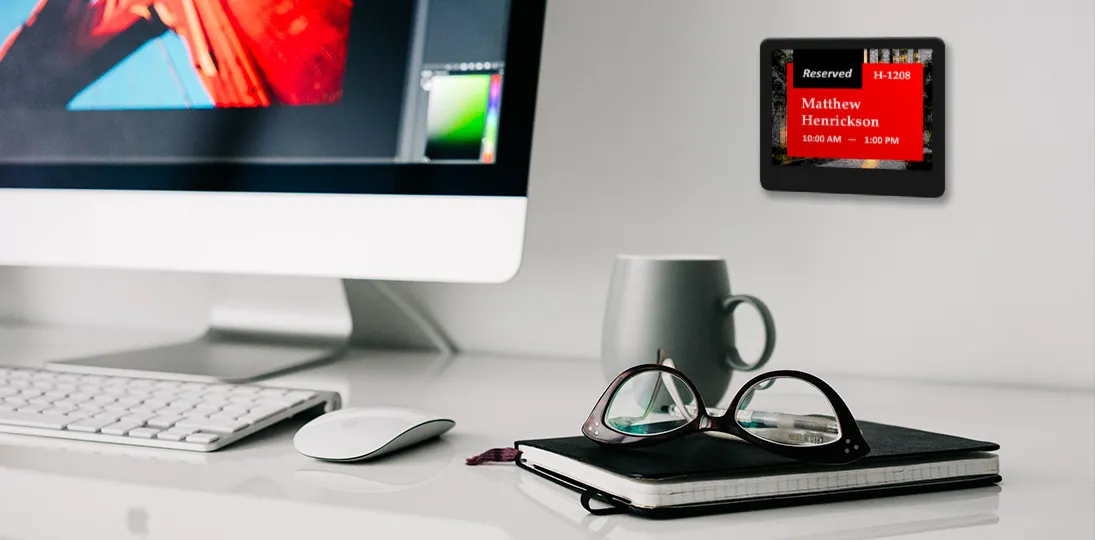
As hybrid work becomes the standard, organizations are rethinking how they manage office space. Office hoteling (a flexible workspace system where employees reserve desks and meeting rooms as needed) has emerged as a practical solution for maximizing space efficiency while supporting remote and on-site workers. But implementing a successful hoteling system requires the right technology, and that’s where ePaper signs make all the difference.
What Are ePaper Signs?
Electronic paper (ePaper) displays use E Ink technology to create paper-like visual displays that are easy to read from any angle, even in direct sunlight. Unlike traditional LCD or LED screens, ePaper signs only consume power when the display changes, giving them exceptional battery life and making them ideal for wireless deployment across large facilities.
Originally popularized by Amazon Kindle e-readers, ePaper technology has evolved into a powerful solution for workplace management. Today’s ePaper room and desk signs integrate seamlessly with scheduling platforms to display real-time booking information for meeting rooms, individual workstations, huddle spaces, and other shared resources.
The Evolution of E Ink Technology
Understanding how ePaper technology works helps explain why it’s so effective for office hoteling applications.
From Gyricon to Modern E Ink
The foundation of ePaper began in the 1970s when Nick Shendon invented Gyricon for Xerox in Palo Alto. The technology used tiny rotating balls (around 100 micrometers) containing Janus particles (named after the two-faced Roman god). These nanoparticles had negatively charged black plastic on one side and positively charged white plastic on the other. By placing them in a grid inside a transparent silicone sheet and suspending them in small bubbles of oil, the particles could rotate based on electrical charges, creating visible text and images.
The goal was to facilitate a paperless office and mimic the look of ink on paper as closely as possible. When a particle’s black side faced up, it looked like ink; when white side faced up, it looked like blank space. The brain processes this information the same way it processes printed books and newspapers.
In 1997, Barrett Comiskey, Joseph Jacobson, and JD Albert at MIT’s Media Lab built on this work, creating the first real electronic paper displays. Instead of rotating plastic balls, they developed round chambers filled with clear fluid containing black and white particles that floated to the top based on electrical charges. That same year, they co-founded E Ink Corporation, which continued improving the product. In 2001, they introduced the active matrix electronic paper display, allowing color changes.
ePaper Goes Mainstream
In 2004, researchers at Philips created inexpensive, thin flexible sheets of electronic paper, greatly reducing costs. Sony used this technology to create the first e-reader, the Sony Librie. While a bit slow and not super high-resolution, it could display text readable in direct sunlight and needed no power to maintain an image, only using power when changing pages.
Three years later, Amazon launched the Kindle, whose success drove innovation and brought costs down further. In 2010, ePaper entered the digital signage world with smart shelf labels (small displays at cashier desks and near products in stores displaying up-to-date product information and pricing). These were easy to install, lightweight, needed no wires, and were easy to read from almost any angle, even in direct light.
ePaper in Workplace Management
2014 saw the first jumbo ePaper display introduced. These 32-inch displays are 25 times larger than standard e-readers and have been used in museums and retail establishments for advertising, wayfinding, and more. 2014 also marked the first introduction of room signs using ePaper and E Ink for workplace applications.
In 2015, Australia began using solar-powered ePaper traffic signs, and the City of London installed ePaper displays at bus stops showing real-time arrival information, interactive route maps, and more. The technology continued evolving with improved color capabilities and larger display sizes.
As of 2025, the largest displays on the market include 75-inch models, with expectations for even bigger displays, increased resolutions, and more color options in the future.
Understanding Office Hoteling and Hot Desking
Office Hoteling
Office hoteling is a workspace management system that allows employees to reserve and utilize workspaces on an as-needed basis, rather than being assigned a fixed desk or office. This approach promotes mobility and flexibility, encourages collaboration, and reduces real estate costs.
In office settings, hoteling takes different forms:
Workspace hoteling refers to reserving various workspace types (private offices, meeting rooms, collaborative areas) based on specific task requirements. This is often part of activity-based working strategies.
Desk hoteling focuses specifically on reserving individual workstations within a shared workspace environment.
With hybrid work models now standard for most organizations, traditional office layouts with rows of assigned desks have become inefficient. Companies have noticed that staff perform better with different workspace types for different tasks. You might need a private office one day, a meeting room the next, and a collaborative space after that. Office hoteling eliminates wasted space and gives workers the flexibility to choose environments that support their work style.
Hot Desking: On-Demand Space Access
Hot desking operates like hoteling but without advance reservations. Employees simply find and claim available spaces when they arrive at the office. While this started in the 1980s and initially received negative reviews (workers didn’t like the uncertainty of not knowing where they’d sit), modern ePaper technology has transformed the experience.
With ePaper displays showing QR codes at each desk, employees can scan with their smartphone camera to access the booking system instantly. They see what’s available in real-time and can reserve a space on the spot.
Hot desking works particularly well for assets that aren’t typically reserved in advance: lockers, bikes, parking spaces, and drop-in workstations. The combination of ePaper displays with QR codes makes the process seamless and eliminates friction.
Key Benefits of Office Hoteling
Flexibility and Freedom
Office hoteling gives employees autonomy to change workspaces based on immediate needs. Instead of being tied to a fixed desk, they can select spaces based on task type, privacy requirements, or collaboration needs. This empowerment promotes personalization and allows employees to create environments that support their preferred work styles.
Additionally, hoteling eliminates territoriality and hierarchies that arise with fixed desk assignments. The emphasis shifts from “my desk” to “our workspace,” fostering an egalitarian culture where employees freely interact and collaborate regardless of position or department.
Efficient Space Utilization
Traditional office setups suffer from underutilized or unoccupied workstations that still cost money. Office hoteling enables much greater efficiency. Organizations can adapt to changing workforce dynamics by ensuring space is allocated to those who need it, when they need it. This flexibility enables better balance between remote work and in-office collaboration, making the most of available resources.
Fewer people on-site at any given time means less office space is needed, leading to cost savings in real estate expenses, infrastructure, technology, and maintenance.
Improved Collaboration and Networking
By breaking away from fixed desk assignments, employees work in different areas and interact with diverse teams. When employees aren’t tied to specific departments or seats, they more easily collaborate with colleagues outside immediate circles. This encourages sharing of ideas, expertise, and perspectives, leading to more innovative thinking and problem-solving.
Office hoteling also encourages spontaneous collaboration and unplanned encounters. When employees move around the workspace with flexibility to choose work areas, they’re more likely to interact with colleagues from different teams or departments, resulting in serendipitous conversations, new connections, and valuable professional relationships.
Reduced Workplace Confusion and Friction
One common challenge with office hoteling is the time wasted searching for reserved workspaces or dealing with occupied desks. Physical displays at each location eliminate this frustration entirely. Employees can quickly verify their reservations at a glance, and those without reservations immediately understand a space is claimed. This visible confirmation system discourages desk squatting and creates a more respectful, organized workplace culture.
Another frequent obstacle is low adoption of booking platforms. When reservation systems exist only in software without physical presence, employees often forget to use them. Visible signage at every workspace serves as a constant reminder that spaces should be booked, naturally driving engagement with your hoteling system and creating better utilization habits.
The integration approach also matters significantly. Solutions that require employees to learn entirely new interfaces or workflows create unnecessary barriers. When desk signs work seamlessly with existing calendaring and booking tools through features like QR codes that launch familiar platforms, the transition becomes effortless. This consistency in user experience removes friction and accelerates adoption across the organization.
Why ePaper Signs Are Perfect for Office Hoteling
1. Exceptional Battery Life and Low Maintenance
ePaper signs only use power when the display changes, delivering an incredible 5+ year battery life with standard, field-replaceable CR2450 cells. No more maintenance headaches, constant battery replacements, or chargers cluttering your space. Designed for 10+ years of service life, this longevity reduces refresh cycles and waste while saving time and money.
2. Simple Wireless Installation
Forget expensive cabling and complex installations. ePaper signs are wireless, lightweight, and mount anywhere in minutes using 3M Command Strips or provided mounts. No outlets, USB hub clutter, or cable routing required. Because they run on batteries, workspaces stay clean and professional. Installation is so simple you can do it yourself without contractor costs.
3. Massive Scalability
Effortlessly display scheduling for hundreds of rooms and thousands of desks across your entire organization. Adding 50 or 500 more units is mostly about placement and assignment, not infrastructure work to bring power and network to each workspace.
ePaper signs can be mounted anywhere: on walls like traditional digital signage, in front of meeting spaces, or integrated with hundreds or thousands of desks, huddle spaces, and lockers. The wireless nature and battery operation make scaling painless.
4. Enterprise-Grade Security and Integration
ePaper solutions seamlessly integrate with existing scheduling software and workplace management platforms. Centralized management pushes updates over RF (radio frequency) throughout the day without user intervention. The dedicated RF wireless network boosts reliability and keeps thousands of endpoints off enterprise Wi-Fi, reducing congestion and eliminating credential management headaches.
5. Lower Total Cost of Ownership
ePaper signs are significantly more affordable than tablet-based room signs, with lower ongoing operational expenses and proven ROI. No AC power runs, long service life, fewer help desk tickets, and fewer network endpoints to manage mean you can outfit your entire facility without breaking the budget or overwhelming IT.
Think of it this way: assuming displays are on for ten hours a day, five days a week, you can power an ePaper sign for two weeks for the same energy cost as powering an LED or LCD screen for one hour. For the same cost as powering a single display for a week, you can power an ePaper display for two years.
6. Environmentally Friendly
ePaper signs have the lowest environmental impact of electronic displays, using 99% less energy than traditional digital displays and eliminating paper schedules. With years-long battery and service life, you reduce electronic waste while cutting energy costs. It’s a win for your bottom line and the planet.
7. Frictionless Workplace Experience
High-contrast, paper-white readability stays crisp from any angle, letting employees easily find available space at a glance. Screen data remains readable even without power, and QR codes enable instant booking at the sign. Because ePaper signs mount anywhere (desk edges, partitions, walls, glass), findability scales across your workplace, reducing frustration and boosting productivity.
8. Fully Customizable
Choose from various screen templates or customize on-screen designs. Customize faceplates to match your brand and office decor with raised room numbers and braille for accessibility. With flexible mounting options and sleek design, ePaper signs enhance workplace aesthetics while delivering the functionality your team needs.
How Scheduling Platforms Make Everything Work
To effectively implement and manage office hoteling, scheduling platforms play a crucial role. These platforms streamline the booking process, providing employees with an intuitive interface to reserve workspaces and resources.
Streamlined Booking Processes
User-friendly scheduling platforms make it easy and efficient for employees to reserve workspaces and resources. With just a few clicks, employees can view availability of different workspaces, choose suitable options, and make reservations.
Modern platforms offer features such as search filters, interactive floor plans, and real-time availability updates, making it simpler for employees to find and secure needed workspace. This saves time and eliminates frustrations associated with manual or outdated booking systems, leading to greater adoption and satisfaction.
Optimal Space Allocation and Utilization
Scheduling platforms provide real-time visibility into workspace availability, enabling organizations to optimize space allocation and utilization. By having a clear overview of which workspaces are occupied and when, organizations ensure resources are allocated efficiently.
Employees easily see which workspaces are available for booking at any given time. This transparency empowers informed decisions and helps them choose workspaces that align with requirements. Many platforms incorporate features such as automatic release of unoccupied workspaces if not claimed within a specified period, preventing unnecessary blockage and encouraging fair, efficient utilization.
Many scheduling platforms provide mobile app versions or can be paired with room and desk signs for employees to see availability at a glance without having to access the system on a desktop or workstation. Ease of access and use is critical for a scheduling platform to provide value.
Data-Driven Decision-Making
Scheduling platforms provide valuable data and analytics that inform decision-making related to office hoteling. By capturing and analyzing usage patterns and trends, organizations gain insights into how spaces are being used.
Management can track workspace bookings and see metrics revealing workspace occupancy rates, peak usage times, and popular areas within the office. This visibility allows them to optimize office layout, rearrange workspaces, or implement measures to balance resource allocation.
Data collected through scheduling platforms contributes to long-term space planning and optimization strategies. By understanding how different workspaces are utilized and which areas are in high demand, organizations make data-driven decisions about future office layouts, investment in specific amenities or resources, and potential changes to overall workplace footprint and experience.
Showcasing Bookings on Digital Signage
Transparency in coworker availability allows employees to easily view when colleagues have booked workspaces. This visibility promotes collaboration and facilitates coordination among team members. If employees know their team members will be working in a particular area, they can plan to utilize adjacent workspaces, enabling seamless communication and fostering camaraderie.
In-office and out-of-office schedules can be displayed on digital signage throughout your facility. Employees can easily view coworker availability, allowing them to work near people they need to collaborate with or personally prefer.
Bookings can be pulled from your scheduling platform and automatically update as changes are made throughout the day. You can also show event and meeting schedules for rooms or display lists of desk reservations to let everyone know where coworkers are sitting that day.
Showcasing bookings on digital signs also encourages social connections within the workplace, crucial when motivating a dispersed workforce. When employees see where coworkers are working, it creates opportunities for spontaneous interactions, impromptu discussions, and exchange of ideas, leading to increased networking, knowledge sharing, and formation of stronger corporate culture.
Best Practices for Implementing Office Hoteling
Choose the right technology: Invest in user-friendly workspace management software that integrates with ePaper displays. Features should include mobile booking, clear floor plans, real-time availability, and simple interfaces.
Establish clear policies: Define booking procedures, cancellation windows, guidelines for fair access, and expectations for maintaining clean, professional work environments.
Offer workspace variety: Designate different workspace types catering to different needs (quiet zones, focus booths, collaborative areas, meeting rooms).
Provide wayfinding support: Use ePaper signs with clear labeling, numbering, and interactive floor maps to help employees locate reserved spaces quickly.
Monitor and optimize: Use analytics from your scheduling platform to understand usage patterns, identify underutilized areas, and make data-driven decisions about space allocation.
Communicate effectively: Regularly inform employees about the hoteling system, how to use it, and the benefits it provides. Address concerns and gather feedback to continuously improve the experience.
Why ePaper Signs Are the Smart Choice
When evaluating solutions for office hoteling and desk booking systems, ePaper signs stand out as the most practical, cost-effective, and sustainable option available. Their wireless nature, exceptional battery life, and seamless integration with scheduling platforms make them ideal for organizations of any size.
Whether you’re managing a small office with a few dozen employees or a large enterprise with thousands of workspaces across multiple locations, ePaper signs scale effortlessly to meet your needs. They reduce infrastructure complexity, lower total cost of ownership, and provide the flexibility required for modern hybrid work environments.
Most importantly, ePaper signs create a frictionless experience for employees. The high-contrast, paper-white displays are instantly readable, QR codes enable on-the-spot booking, and real-time updates ensure information is always accurate. This combination of simplicity and functionality makes ePaper signs the smart choice for office hoteling success.
Frequently Asked Questions
How long do ePaper sign batteries really last?
ePaper signs typically last 5+ years on standard CR2450 batteries and can last up to 10 years depending on how frequently the display changes. Since the signs only use power during display updates, battery consumption is minimal.
Can ePaper signs integrate with our existing booking system?
Yes, most ePaper solutions integrate seamlessly with popular scheduling platforms like Microsoft 365, Google Workspace, and specialized workplace management software through APIs or dedicated connectors.
How difficult is installation?
Installation is remarkably simple. Since ePaper signs are wireless and battery-powered, they can be mounted using adhesive strips or basic mounting hardware without any electrical work or network cabling required.
What’s the difference between office hoteling and hot desking?
Office hoteling involves reserving workspaces in advance through a booking system, while hot desking allows employees to claim any available space on a first-come, first-served basis without prior reservation.
Are ePaper signs readable in all lighting conditions?
Yes, ePaper technology uses reflected light (like paper) rather than backlit displays, making them highly readable in all lighting conditions, including direct sunlight.
How many ePaper signs can a single system manage?
Modern ePaper systems can manage thousands of signs across multiple locations using dedicated RF networks, making them ideal for enterprise-scale deployments.