Upgrading your Visix applications to a more current version can improve system performance, expand functionality and provide you with new tools to reach your audience with dynamic visual communications.
Support agreement customers receive free software updates, while other clients can purchase the applicable upgrade. Our Client Services Group will work with you to determine the best options for both software and hardware upgrades.
Our most recent software updates:
AxisTV Version 7.2 was released on December 13, 2011. Download of the new software is free to all customers with a current Software Maintenance Agreement (SMA).
Version 7.2 contains many new features and feature enhancements. Some of the highlights include:
Important Notice: With the release of 7.2, AxisTV no longer supports the sever-based conversion of PowerPoint used by some customers with earlier versions of PowerPoint and AxisTV. There are now three ways to incorporate content designed in PowerPoint.
Note: In order to upgrade to AxisTV Version 7.2.0, you must verify that your current hardware meets the minimum specifications. Please contact Visix at support@visix.com if you have any questions. If your current hardware does not meet minimum requirements, Visix offers a hardware trade in program with discounts on hardware for existing customers.
AxisTV version 7.1.0.1 was released on April 8, 2011. Download of the new software is free to all customers with a current Software Maintenance Agreement (SMA).
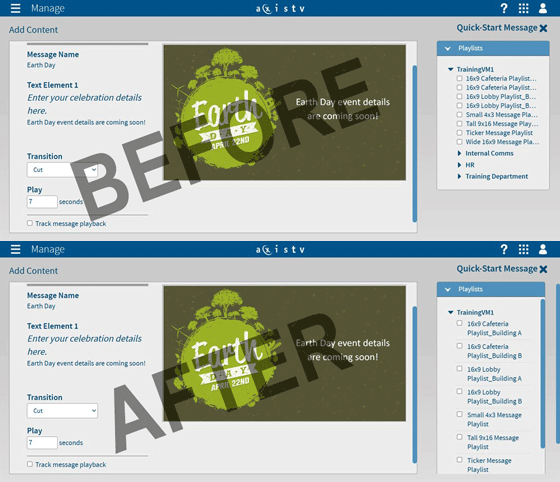
AxisTV version 7.1 contains a number of enhancements to the user interface and overall functionality. Some of the highlights include:
Most notably, AxisTV 7.1 includes significant changes to PowerPoint functionality. First introduced in version 7.0.23, the new PowerPoint features provide users with the ability to import PowerPoint 2003, 2007, and 2010 presentations for native playback on the Channel Player. This requires the customer to purchase and install a licensed copy of PowerPoint on each Channel Player designated to display PowerPoint presentations. This option no longer requires PowerPoint to be installed on the content manager and will address issues with importing PowerPoint due to changes in the Microsoft Server 2008, Windows 7 operating systems and PowerPoint 2007 and 2010. Additionally, it provides higher quality playback because the PowerPoint file does not have to be converted to JPEG images or Flash.
Important Notice: 7.1 is the last AxisTV release with support for server-based conversion of PowerPoint files to still images or Flash files. This release provides a bridge for existing clients, relying on this functionality, to migrate to native PowerPoint installations on each Channel Player or converting PowerPoint to WMV files through PowerPoint 2010. With the release of AxisTV version 7.2 in the summer of 2011, Visix will no longer support server-based conversion of PowerPoint (.ppt or .pptx) files.
Please be advised that applying version 7.1 will drastically change the way that your users import PowerPoint into the AxisTV Web User Interface. Customers who apply 7.1 and wish to use server based-conversion for PowerPoint will be required to use the new PowerPoint and Arrange feature in AxisTV. PowerPoint and Arrange, which also includes the ability to view thumbnails when using native playback will not be available after 7.1. The ability to view thumbnails requires an ActiveX control to be downloaded onto the user's PC. Additional security configuration on the content manager may be required. Administrators and users should be aware of these requirements prior to installing the update. Please read the PowerPoint Requirements section in the AxisTV Combined Manual for more information.
Note: In order to upgrade to AxisTV Version 7.1.0, you must verify that your current hardware meets the minimum specifications. Please contact Visix at support@visix.com if you have any questions. If your current hardware does not meet minimum requirements, Visix offers a hardware trade in program with discounts on hardware for existing customers.
AxisTV version 7.0.23 was released on September 28, 2010. Download of the new software is free to all customers with a current Software Maintenance Agreement (SMA).
AxisTV release 7.0.23 provides users with the ability to import PowerPoint 2003, 2007, and 2010 presentations for native playback on the media player (channel player). This requires the customer to purchase and install a licensed copy of PowerPoint on each media player designated to display PowerPoint presentations. This option no longer requires PowerPoint to be installed on the content manager,and will address issues with importing PowerPoint due to changes in the Microsoft Server 2008 operating system and PowerPoint 2007. Additionally, it provides higher quality playback because the PowerPoint file does not have to be converted to JPEG images or Flash.
Customers who wish to play QuickTime files or use the Exchange 2007 adapter to import event schedule data are also encouraged to apply the update. Version 7.0.23 addresses defects related to these features.
Customers who do not use PowerPoint, QuickTime or the Exchange Adapter with Exchange 2007; or who are currently importing PowerPoint with no issue and no desire for native playback do not need to apply the update.
Note: In order to upgrade to AxisTV Version 7.0.23, you must verify that your current hardware meets the minimum specifications. Please contact Visix at support@visix.com if you have any questions. If your current hardware does not meet minimum requirements, Visix offers a hardware trade in program with discounts on hardware for existing customers.
AxisTV version 7.0.22 was released on June 15, 2010. Download of the new software is free to all customers with a current Software Maintenance Agreement (SMA).
This release includes all builds to date and offers a variety of new features, enhancements and bug fixes for a significantly improved user experience. Notable items of the update are CAP Compliant Mass Alert Notification, QuickTime Support and Theme Backgrounds.
MASS ALERT NOTIFICATION
The ability to quickly communicate to groups of individuals in the case of an emergency has become critical for higher education and businesses throughout the world. AxisTV now has the ability to respond to mass alert notification conditions by halting all normal operations and focusing all system resources exclusively on the processing and distribution of mass alert content to all players that are part of the installation.
AxisTV's mass alert notification also supports the Common Alert Protocol 1.1 (CAP) standard, as described by OASIS. AxisTV can handle both synchronous and asynchronous CAP alerts from third parties. This release of the Mass Alert Notification feature provides integration with e2Campus through the CAP listener.
The Mass Alert Notification will continue until an intentional action is taken to stop it. This interaction can be prompted by an authorized user through a specially designed screen, a cancellation or expiration date by a third party through CAP, or a cancellation by a third party through a previously defined web service.
SUPPORT FOR QUICKTIME FILES
AxisTV now supports QuickTime file and streaming playback. By default, QuickTime will automatically check for QuickTime updates, but it is possible to turn off this action.
THEMED BACKGROUNDS AND LAYOUTS
New color-themed backgrounds and layouts for AxisTV have been added to enhance the user experience and provide a more coordinated presentation of content. During Initialize Device or Upgrade Device, these themes will be inserted into the background library. Three themes are included in this release: Elegant Blue, Elegant Black and Elegant Ecru. Each theme set includes four layout wallpapers with 47 matching backgrounds.
FOLDER FUNCTIONALITY
To better organize the new theme backgrounds and all other files in the background library, the ability to create folders has been added to Manage | Background Library. This allows AxisTV users to arrange backgrounds into user-defined folders. Users can also group backgrounds by type of background.
PLAYLISTS DISPLAY AND UNSCHEDULE
AxisTV now allows an authorized user to unschedule bulletins from one or all playlists under Manage | My Content and crawls from one or all crawllists from Manage | My Tickers.
Note: In order to upgrade to AxisTV Version 7.0.22, you must verify that your current hardware meets the minimum specifications. Please contact Visix at support@visix.com if you have any questions. If your current hardware does not meet minimum requirements, Visix offers a hardware trade in program with discounts on hardware for existing customers.